How Do You Learn Feed the Beast
Updated Last: 16/05 Key: 
Guide may be modified.
Please Like if you enjoy.
Comment below on what you think?
Orange = Modpack
Red = Link
Green = Key Words/Important
Blue = User
Purple = Mod
Bold +/ Underlined = Sections
Increased Text Size = Section Title
Contents:
Introduction
About FTB
Modpacks
World
Starting Fresh
Entities
Multiplayer
Tips and Tricks
Other Guides
Links
FAQ
Credits
To Do List
Introduction
Hello fellow FTB'ers, I have kindly decided I would make a complete guide of FTB, for humble beginners to learn and wise veteran's to remember.
This guide will cover almost everything about FTB, and may not be 100% accurate, but it's worth following if your stuck/struggling/looking for something to do etc.
Any websites mentioned will be at the bottom of the guide in the "Links" Section.
So, without further ado, let's get started...
About FTB
FTB is a group of people create modpacks, maps and media, all containing mods for vanilla minecraft.
FTB originally started off as a modded skyblock challenge, soon the maps became more popular and FTB then needed a launcher, it was that popular!
Now, at this point in time, FTB is widely known and has more variety in mods.
It now has modpacks, maps, texture/resource packs and you-tubers videoing their FTB server.
Don't wait to try it out, its EPIC!
You can expect more from FTB in the future, meanwhile, go check out the latest news and FTB store.
Modpacks
Everyone should know what these are, but if you don't, I'll give you a brief explanation.
A modpack, as you would expect, is a pack of mods put together into what we call a "Modpack", fancy title and all.
Below is a list of modpacks with a key information I have included, enjoy.
Please consider these are only the official or popular modpacks listed.
Modifying Modpacks
Jadedcat has done a video on modifying modpacks.
If you want to know how to add a mod to the pack your using, and it isn't in there already.
Go check out Jadedcat's video below, it will definitely help you.
Theme Popularity
The most popular modpacks are the one with a technology/magic crossover.
Arguably, FTB Monster would be the most popular due to this theory.
Most users are attracted to a good and large selection of mods with a ranged mix between magic and technology. (People like magic and tech in a modpack.)
World
It's a big a big world out there, and with FTB you must be prepared.
With FTB you have double the experience, double the quality and more than double the base and biome size!
When generating a world, most players like to use a world generation mod. The main and most known one currently are ExtraBiomesXl, Biomes o' Plenty(BoP), Highlands and Alternate Terrain Generation(ATG).
They are all unique in a way and provide different terrain generation. For example, I have found that Highlands provides wonderful grass textures, the best meadows, and great forest mountains!
While BoP has given me a bit of everything, mountains that are alright for quality, same for the meadow, but BoP is great for jungles and swamps!
ExtraBiomesXL Features:
FTB's first, and original world generation mod!
http://www.minecraftforum.net/topic/1090288-164-extrabiomesxl-3151/
-Original and well-known mod.
-Biggest amount of biomes.
-Large mod compatibility.
-Not used by FTB anymore.
Biomes o' Plenty Features:
A bit of everything, so you are satisfied.
http://www.minecraftforum.net/topic/1495041-16x-forge-biomes-o-plenty-v112-1-year-anniversary/
Quantity before Quality with this mod!
Advantages:
-Most unique biomes.
-Main FTB world generation mod.
-Compatible with a lot of other mods.
-Small to mediumly sized biomes.
Alternate Terrrain Generation Features:
Smooth and realistic world generation for those who love realism.
http://www.minecraftforum.net/topic/1932156-16x-atg-alternate-terrain-generation/
-Smooth and realstic terrain.
-Other world generation mods compatibility.
-Hardly any new biomes.
-Not many new blocks or items.
Highlands:
Mountain and meadow specialized.
http://www.minecraftforum.net/topic/1602064-164-forge-highlands-biomes-trees-and-more-v217a/
-Best mod for mountains and meadows.
-Great textures.
-Double Ores!
-Not many new blocks or items.
-Other biomes aren't specialized in.
Imagine starting a world in vanilla minecraft, easy right? You just get some wood, kill some sheep and build your way to vanilla's limits.
Now imagine a world where vanilla is expanded, expanded so much it can hardly still be called "Vanilla", it becomes modded minecraft, and in this case, it becomes FTB!
So you just created a survival world in FTB, and you wanna know how to begin, well then, carry on reading!
Firstly, this is something I can't stress enough, and I'll put it in a simple saying for your convenience, "Don't do big on small".
Sounds a bit weird right? But what I'm actually getting at here is that on your "small starting" first day don't go and do "big projects" such as entering a dungeon, building a mob spawner, trying to make peace with creepers yada yada etc.
The only things you need to worry about on your first day are:
-Bed (A place to sleep)
-Breakfast (Raw steak)
-Shelter (Mud hut)
Just stick with that, and you'll be fine!
Now I know that wasn't the best guide of all time, but I haven't got all day. So go and view some other people's guides they kindly took the time to make:
http://minecraftftb.wikia.com/wiki/Beginners'_Guide_to_FTB
http://wiki.feed-the-beast.com/Getting_Started_(Main)
http://www.youtube.com/watch?v=iTFaR2e7sjQ
Entities
Entites are everything that lives, moves or acts.
You can be classed as an entity, as you are a player, or human in the Minecraft world.
All Mobs (Inlcuding FTB W.I.P)
Vanilla Mobs: - 1.6.4
http://minecraft.gamepedia.com/Mobs
Chicken
Cow
Horse
Ocelot
Pig
Sheep
Bat
Mooshroom
Squid
Villager
Cave Spider
Enderman
Spider
Wolf
Zombie Pigman
Wolf - Dog
Ocelot - Cat
Horse
Blaze
Creeper
Ghast
Magma Cube
Silverfish
Skeleton
Slime
Spider Jockey
Witch
Wither Skeleton
Zombie
Zombie Villager
Chicken Jockey
Thaumcraft:
Angry ZombieWisp
Pech
Tainted Monster
Hellbat
Lycanites Mobs:
http://lycanitesmobs.nephrite.co.uk/creature
Plains Creatures:
Kobold
Ventoraptor
Ent
Trent
Ghoul Zombie
Dweller
Ettin
Lurker
Eyewig
Aspid
Remobra
Geken
Uvaraptor
Crypt Zombie
Crusk
Clink
Joust
Erepede
Gorgomite
Manticore
Reiver
Inferno Creatures:Cinder
Demon Creatures: Belph
Behemoth
Pinky
Trite
Asmodi
Nether Soul
Cacodemon
Twilight Forest Mobs:
http://twilightforest.wikispaces.com/#x-Creatures
Deer
Bighorn Sheep
Boar
Rabbit
Tiny Bird
Squirrel
Raven
Penguin
Firefly
Carminite Brooding
Carminite Ghastguard
Carminite Ghastling
Carminite Golem
Death Tome
Fire Beetle
Hedge Spider
Hostile Wolf
King Spider
Kobold
Maze Slime
Minotaur
Mistwolf
Mosquito Swarm
Pinch Beetle
Redcap Goblin
Redcap Sapper
Skeleton Druid
Slime Beetle
Swarm Spider
Towerwood Borer
Quest:
Quest Ram
Boss:
Naga
Lich
Hydra
Minoshroom
Ur-Ghast
Knight Phantom
Thermal Expansion:
Blizz - http://ftbwiki.org/Blizz
Farlanders:
Passive
Elder Farlander
Farlander
Wanderer
Neutral
Classic Enderman
Mystic Enderman
Enderminion
Mystic Enderminion
Ender Guardian
Tameable
Enderminion
Mystic Enderminion
Hostile
Ender Golem
Fanmade Enderman
Looter
Rebel Farlander
Titan
Ars Magica 2:
Evil Mobs:
Darkling
Dark Mages
Hecate
Mana Creeper
Mana Elemental
Water Elemental
Good/Neutral Mobs:
Light Mages
NPC Villager Mage
Dryad
Summoned Mobs:
Summoned Battle Chicken
Summoned Earth Elemental
Summoned Fire Elemental
Summoned Lich
Summoned Shadow
Summoned Skeleton
Neutral until Attacked Mobs:
Wisp
Tower Guardian
More FTB Mobs to be added!
FTB Multiplayer
Just like vanilla minecraft FTB is has multiplayer.
Below are the two ways to setting up multiplayer to your FTB.
Local Area Network is a very simple but useless way to play multiplayer.
Your friends will only be able to connect their share your internet and your world is open, and it has very, very limited features.
To set up LAN, do as mentioned below:
1. Exit to the Pause Menu (ESC)
2. Click "Open to LAN".
3. Choose the settings then press "Start LAN World"
4. Your LAN is now open.
Better Explanation: http://www.punchwood.com/index.php?/topic/7727-how-do-i-make-a-minecraft-lan-world/
Servers a bit more tricky and in a few cases,
pricey.
For example, you would need to host a server on your PC all day not stop for free, or you could pay another company to do it 24/7.
I would recommend CreeperHost especially as they are FTB's Sponsor.
Setting up a server is quite hard to explain so I shall provide you with some videos below to explain it:
-Wait for a modpack release you know will last long before losing interest.
-Don't rush into learning FTB.
-Don't do anything related to mods on the first day, just get all the usual resources wool, wood, stone
etc.
-Don't give yourself a headache. When you feel ill, stop and quit technology for a bit.
-Be wise, if you go into a cave full of monsters with no protection, your screwed, so think before doing anything.
-Don't jump between mods, learn and master one mod, then expand to cover other compatible mods and how they interact with one another.
Other Guides
This is only a general guide, please take the time to view other guides that cover specific mods in complete detail.
Beginner's Guide to Blood Magic - Padfoote
http://forum.feed-the-beast.com/threads/beginners-guide-to-blood-magic.39927/
Getting started with Feed the beast - Kariko83
http://forum.feed-the-beast.com/threads/getting-started-with-feed-the-beast.4134/
Tutorials for all the new Horizons Mods - VikeStep
http://forum.feed-the-beast.com/threads/tutorials-for-all-the-new-horizons-mods.35408/
Below is a few links to help you, make sure to check each one!
FTB Main Site: http://feed-the-beast.com/ FTB Forum (Where you probably are now) : http://forum.feed-the-beast.com/ FTB Official Wiki: http://wiki.feed-the-beast.com/Main_Page FTB Unofficial Wiki (OUTDATED) : http://feed-the-beast.wikia.com/wiki/Feed_The_Beast_Wiki FTB Unofficial Wiki: http://ftbwiki.org/Feed_The_Beast_Wiki FTB Official Webstore:
CreeperHost Server Hosting (FTB Sponsor) : http://www.creeperhost.net/
FTB Modpack Changelog Site: https://feedthebeast.atlassian.net/wiki/display/PML/Public Modpack Listings
JVM Arguments for Modded Minecraft: http://forum.feed-the-beast.com/threads/jvm-arguments-for-modded-minecraft-updated-12-30-13.28994/
FAQ
Below in the spoiler you shall find a list of frequently asked questions.
Which Modpack?
This is a choice of personal preference, however, the most popular is FTB Unleashed, the spiritual successor to FTB Ultimate.
If your a tech only person, go for Techworld, if your a magic person, then Magicworld is for you, and if you just want the most enjoyment combining tech and magic, go for Monster, Horizons, Unleashed or Direwolf 20.
What's with all the new modpacks coming out every month? I know, I hate it to, I just wish they could stick to one and update it but with modded minecraft it's always updating and never keeps still.
As long as your world doesn't corrupt you'll be fine updating to new versions.
Try to deal with it, I'm sure they'll decide what they're going to do soon.
If you are getting lag constantly, then I suggest improving your pc or adding Java Parameters.
I recommend high quality game-able pc for FTB, as there is a very heavy use of mods that will destroy your pc performance.
But if you have a slow pc, then maybe play a light use of mods modpack, in other words, play FTB Lite.
You could potentially add Java Parameters or increase RAM but there is not guarantee it will improve your game or performance.
If you are having trouble running FTB, try what is contained in the links below:
Potential Crash Fix:
Java Parameters:
http://forum.feed-the-beast.com/threads/jvm-arguments-for-modded-minecraft-updated-12-30-13.28994/
I need help?
If you are in need of help post your topic in the "General Discussions" section, if it is technical post in "Technical Support".
ExtraBiomesXL, Biomes o' Plenty or Highlands?
Again this is really down to personal preference, but I would like to mention that ExtraBiomesXL probably won't be in FTB again.
Feel free to add to any modpacks you want, but be warned of ID conflicts.
In my survival world I use Highlands and just look at the beautiful scenery I get:
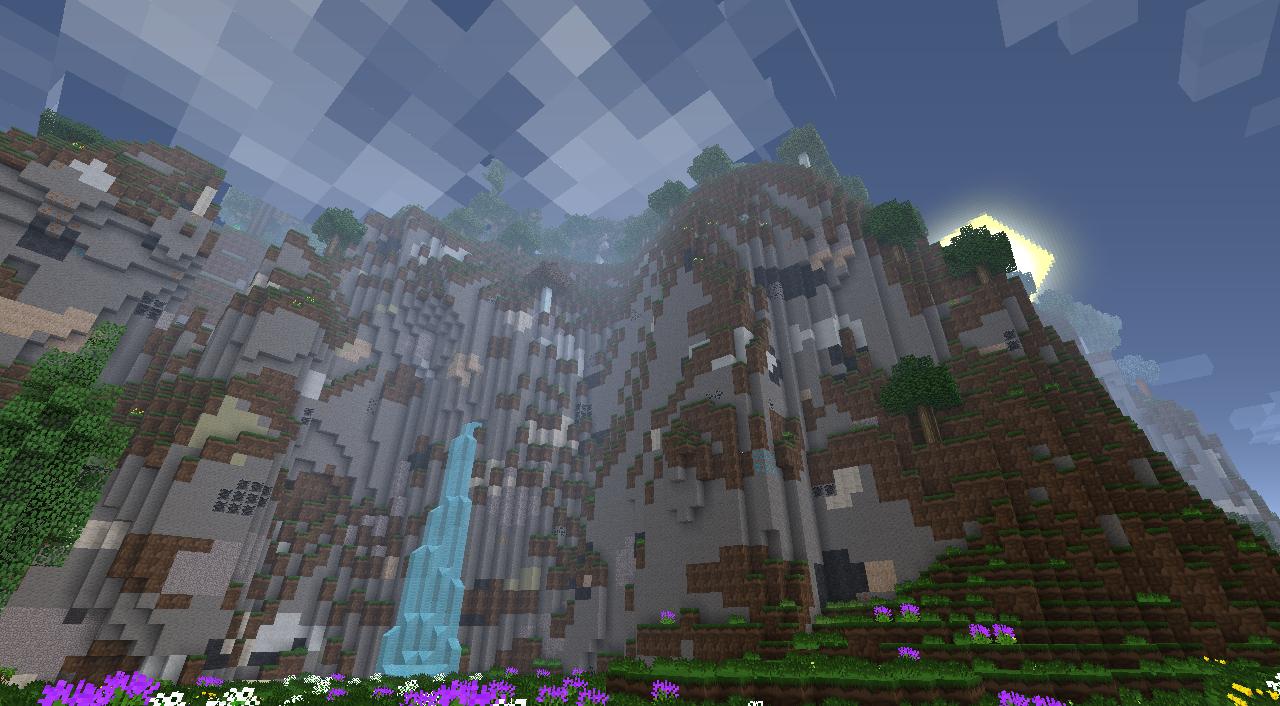
Not the place, go here though and I guarantee someone will come to your aid.
http://forum.feed-the-beast.com/threads/ask-a-simple-question-get-a-simple-answer.9625/
This guide is great!
Thanks, I'm glad you think so.
Don't forget to comment and hit that like button before you leave!
To Do List
Last Updated: 08/02/14 -Expand guide to cover more topics.
-Include more detail in sections.
-Check everything is up-to-date.
-Add more information in sections.
-Build on organizing guide.
Thanks to everyone who helped down in the comments!
If you enjoyed this thread, please like and comment below to show your appreication,
Did you like it? Anything I need to include?
Thanks again,
RealSketch
Source: https://forum.feed-the-beast.com/threads/reals-ftb-guide.40043/
0 Response to "How Do You Learn Feed the Beast"
Postar um comentário